

Microsoft Power Automate Invoice Automation Essentials
The Microsoft Power Automate Invoice Process
- Transaction Intake Flow: ERP transactions enter configured flows where relevant records are identified for downstream invoice processing.
- Information Enrichment Stage: Additional customer, tax, product, and finance details are gathered before structured invoice creation begins.
- Human Review Routing: Approval actions direct selected invoices toward responsible users when business rules require human decisions.
- Automated Document Handling: AI Builder and connected actions can process supporting documents within defined automated invoice workflows.
- Completion Status Tracking: Flow outcomes record processing results while notifications and follow-up actions support operational visibility and monitoring.
Connecting Microsoft Power Automate With Advintek
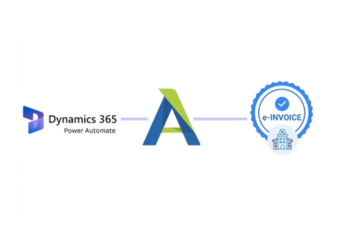
Advintek can use Microsoft Power Automate as an automation layer for invoice-related processes, connecting ERP events, document intelligence, approvals, desktop applications, process information, and structured e-invoicing services.
- ERP events launch invoice automation workflows
- AI models extract document information automatically
- Approvals route exceptions to responsible teams
- Desktop flows automate legacy application tasks
Business Value From Microsoft Power Automate Invoice Flows
- Reduced Manual Handoffs: Automated actions transfer invoice information between applications without repeated copying across disconnected business processes.
- Faster Document Processing: Document automation can reduce repetitive handling when invoices and supporting records enter established workflows.
- Controlled Approval Routing: Defined approval paths provide consistent handling for invoices requiring authorization before subsequent processing stages.
- Legacy Application Access: Desktop automation can extend workflows to applications that cannot support conventional connector-based integration methods.
- Process Improvement Evidence: Process mining highlights delays and rework patterns that can inform future invoice automation improvements.
Advanced Tools for Ireland Invoicing
AI Document Processing
AI Builder can extract invoice information from supported documents within automated business workflows.
Desktop Automation Coverage
Desktop flows can automate repetitive tasks across Windows applications and established desktop processes.
Process Mining Intelligence
Process mining can identify bottlenecks, rework, and automation opportunities across invoice operations efficiently.
Microsoft Power Automate Support for Ireland
Ireland businesses can connect ERP transactions with automated invoice workflows while using document intelligence, approvals, desktop automation, process analysis, and structured e-invoicing services.
- Finance teams monitor automated invoice outcomes
- ERP records remain connected through workflows
- Supporting documents follow processing paths
- Process insights guide future automation improvements
Microsoft Power Automate for Ireland Billing
Start automating Microsoft Power Automate invoice workflows with Advintek today.
Connect ERP processes with structured invoicing.
Ready e-Invoice System
Frequently Asked Questions Power Automate e-Invoicing Ireland
Can Microsoft Power Automate connect different ERP systems for invoicing?
Microsoft Power Automate is designed to automate workflows between applications and services through cloud flows, connectors, desktop flows, and other automation capabilities. For an e-invoicing process, it can coordinate information originating from different ERP environments and pass relevant data toward Advintek while maintaining defined workflow logic between connected systems.
How can AI Builder process invoice documents?
AI Builder can add document-processing intelligence to Microsoft Power Automate flows. Depending on the configured model, invoice-related workflows can extract information from supported documents and use the resulting data in subsequent actions. This can reduce repetitive document handling before information is validated, transformed, approved, or passed into e-invoicing processes.
What happens when an invoice requires human approval?
A Microsoft Power Automate approval action can send a decision request to a designated user or group. The workflow can then follow different paths based on the response. For e-invoicing, this can provide a controlled checkpoint for selected transactions before they continue toward validation, submission, or other downstream processing.
Can Microsoft Power Automate automate older ERP applications?
Desktop flows provide robotic process automation for Windows applications and can help automate tasks where conventional connectors are unavailable. This can be relevant when businesses operate older ERP interfaces or desktop-based finance applications alongside newer systems. Advintek can sit within the broader workflow while Power Automate coordinates the required application interactions.
How can process mining improve ERP e-invoicing workflows?
Microsoft Power Automate Process Mining can examine process information to identify bottlenecks, rework, root causes, and automation opportunities. Microsoft describes process mining as a way to discover insights from business-process data. For invoice operations, those insights can help teams identify where ERP-to-invoice processes need redesign or automation.